What Is a Smart TV? An Explanation of Technology and Benefits
AUTHOR: Joshua MartinUPDATED: January 5, 2026
Many consumers have converted their homes into smart homes over the past few years, and the numbers continue to grow. Berg Insight reports that at the end of 2017 there were an estimated 22 million smart homes in North America. They predict the number will be closer to 63 million by the year 2022.
More people are starting to realize that smart home technology makes life easier and more enjoyable. And with the plethora of smart devices currently available, it’s hard to keep from buying and installing them all.
From smart plugs to doorbell cameras, smart washers and dryers to smart door locks, the options are endless.
One device has been on the market for quite some time, but has been out of the spotlight lately. Its popularity has grown to a point where it almost seems commonplace to own one.
I’m talking about the smart TV. Despite its popularity, I’ve been seeing some basic questions pop up recently, so I thought I would address them here today. After owning several smart TV’s myself and looking into some of the newer technology, here is what I can tell you.
What is a smart TV? A smart TV is similar to a standard television, but it can also access the internet through a Wi-Fi or hardwired ethernet connection. In addition to watching television shows, you can download apps, connect to social media, browse online content, and even download and stream music and movies.
The smart TV is one device you don’t want to leave out of your home automation system. In this article, I’m going to cover some of the basics of a smart TV and answer some of the more frequently asked questions.
Smart Home Deals @ AmazonSmart TV – More Than Your Average TV
I’d venture to say it’s easier to find a smart TV today, than it is to find a TV that doesn’t include any smart technology or the ability to connect to the internet. Just walk into your local Best Buy or look around on Amazon. You will see aisle after aisle and page after page of endless smart TV options.
Smart TV’s are becoming the new standard. Nobody wants a basic TV anymore. How boring, right? I mean, if you can’t download the Netflix or Hulu app and stream straight from the TV then, no, thank you.
It’s easy to understand why smart TV’s have become so popular. Almost every part of our life revolves around the internet now. We are practically attached to our smartphone or computer checking social media accounts, shopping online, or watching the latest cat videos on YouTube.
Smart TV’s allow you to stay connected even when you’re off your phone. For those that can’t be away from Facebook or Instagram or those who need to have a constant stream of entertainment, the smart TV is a dream come true.
Smart TV’s Are Becoming More Affordable
Another reason for the growing popularity of the smart TV is the price. More competition in the marketplace, as well as lower costs for the technology itself, has driven down prices over the last 5 years.
Sure, you can still spring for that 75-inch 4K Ultra HD LED model that will run you north of $2,000, but for the most part, you really don’t have to break the bank to anymore. A good mid-sized smart TV with HD resolution and all the latest features will range anywhere from $250 - $1,000.
But there is another reason why smart TV’s have such low prices. And this is one that most people aren’t aware of. Some smart TV manufacturers keep the price for the actual device low because they make up the revenue through different channels (no pun intended).
Some manufacturers are collecting user data, such as what shows you like to watch, what apps you’ve downloaded, your search history, and where you are located. They turn around and sell this information to third parties who are hungry for that type of data. The third parties are mostly content providers who use the data to determine how to market their products.
Another way smart TV manufacturers are able to keep overall pricing down is through shared revenue from advertising and sales of TV shows and movies. Manufacturers partner with companies to feature their paid content or services on the smart TV, then they both share the revenue once the user converts into a sale.
Smart TV Operating Systems
Not all smart TV brands use the same operating system (a.k.a. platform). It depends on which television you purchase, but in most circumstances, reading the spec sheet or asking an expert in the store will let you know which operating system you are dealing with.
Each operating system will come with a different set of preloaded apps, but more apps can always be downloaded from the operating system’s app store.
Apps let the user access different services like social media (Facebook, Twitter), music and media streaming (Netflix, Pandora, Spotify), online shopping (Ebay), and communication (Skype).
And not every app is available on every operating system. Some apps are exclusive to their platform. Before purchasing a smart TV make sure it’s operating system includes all the apps that you are interested in.
Here is a list of some of the more popular smart TV brands and which operating system is installed:
- Samsung – Tizen
- LG – WebOS
- Sony – Android TV
- Insignia, Hisense/Sharp, Hitachi, TCL, Philips – RokuOS
- Element, Toshiba, Westinghouse – Amazon Fire TV
- Vizio – SmartCast
Smart TV’s Now Include Smart Assistants
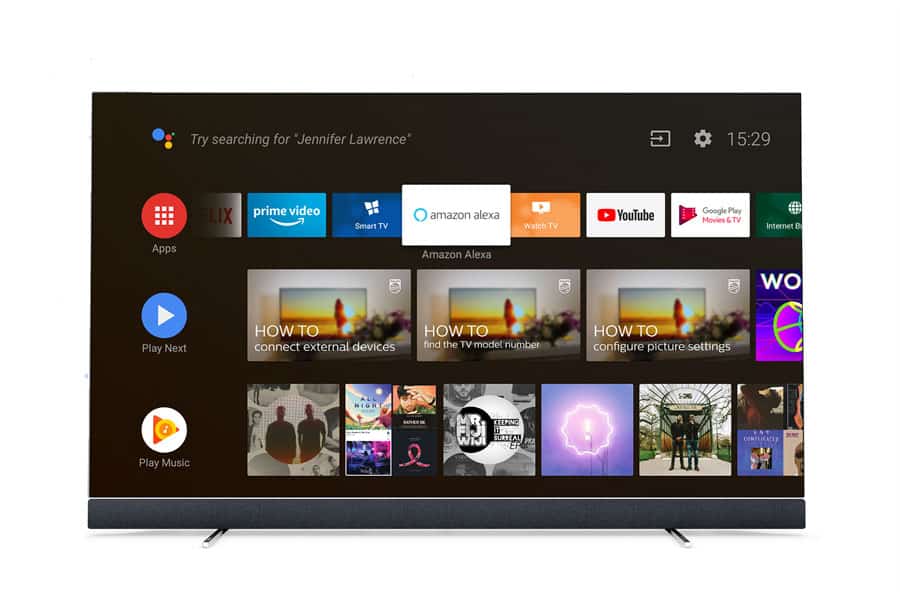
Image Courtesy of: TP Vision
These options are relatively new, but some smart TV manufacturers have models with a smart assistant already built in.
Brands like Philips, Sharp, and LG have smart TV models with Google Assistant built in. Westinghouse, Element, and Hisense are offering TV’s with Amazon’s Alexa built in.
This offers some dramatic new benefits. Now, you can control your smart TV with simple voice commands through a microphone on your remote or through an app on your smart phone.
Commands such as “Change the channel to ESPN.”, “Turn down the volume.”, or even “What’s the weather like today?” or “Search Google.” are all possible with a smart assistant equipped smart TV.
You can also connect other smart home devices to the smart assistant, allowing you to control other aspects of your home automation system with voice commands. Smart lighting, speakers, and even security cameras can be connected to the smart assistant installed in the smart TV.
In this case, your smart TV would be acting as the hub for your home automation system. Pretty cool if you ask me.
Smart TV’s Perform Regular Updates
I love this feature. Smart TV’s will keep your applications and software up to date by searching at specific time intervals for regular updates just like your smartphone or PC would do for you.
This will keep all your programs using the newest software and help eliminate bugs and other common problems.
Be sure to check out our article on the security and privacy risks of smart TV's. We do a deep dive on the subject and give you 4 tips to help prevent those risks. You can find the article by clicking here.
Alternatives to Smart TV’s
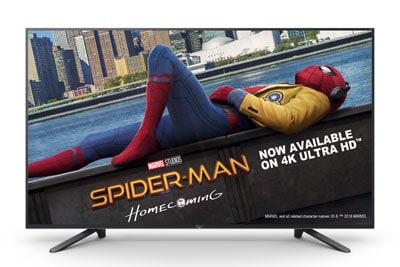
Image Courtesy of: Sony
If you don’t have the budget for a smart TV, there are options to stream online content on your current TV. Alternatives such as media streaming devices and Blu-Ray disc players can give your TV some of the same functionality as a smart TV.
Media Streaming Devices
Media streaming devices come in the form of a set-top box or a streaming stick. A set-top box is exactly what it sounds like, a little device that sits on top of your TV or TV stand. A streaming stick looks like a USB stick, but is a little bigger.
Both the set-top box and streaming stick plug into your TV’s HDMI port and connect to the internet through Wi-fi or an ethernet cable.
These devices will allow you to stream video and music content online. Most come with some free options to view content like YouTube, Vudu, and Pluto TV. But you will have to subscribe to services such as Netflix, Amazon Prime, and Hulu Plus in order to use them.
Media streaming devices are also capable of playing music and movies or viewing photos from your local network. They can also access this media from flash drives or external USB drives.
Some popular media streaming devices include the Amazon Fire TV Stick, the Roku Ultra, the Roku Streaming Stick, and Apple TV.
Blu-ray Disc Players
Blu-ray disc players can not only play Blu-ray discs, DVD, and CD’s, but they also provide access to some internet streaming channels.
The channels available will vary among different brands and models. And the variety and number of channels is not as wide-ranging as a set-top box or streaming stick.
None the less, Blu-ray players offer a simple alternative to smart TV’s if you want to view streaming content on your current TV.
Smart TV’s Offer Convenience at Affordable Prices
With how affordable smart TV’s are today, it’s no question why they are becoming a household item across the world. They are easy and convenient to use, and everyone likes having access to stream their favorite programs with a simple click of the button.
It makes perfectly good sense to me to throw a smart TV into the mix to make your home automation system that much more complete.
Related Questions
Are Smart TV’s Worth It? If you stream a lot of online content and like to be on the internet all the time, I would say that a smart TV is worth it. You can also save money by “cutting the cord” and eliminating your cable bill.
Another benefit is not having to deal with multiple remote controls for the TV, the streaming device, the speaker system, etc. A smart TV will be able to control everything with one remote.
Will a Smart TV Work Without a Router? Technically, yes. A smart TV can work without a router. You can connect by using an ethernet cable directly from your modem into the television. Not all smart TV’s come with an ethernet port, so be sure to double-check or ask if this feature is included before purchasing your smart TV.
I Have a Smart TV, but My Internet Connection Is Weak. Some older routers struggle to send out a strong, high-quality signal. A great solution is to use a Wi-Fi range extender. A Wi-Fi range extender will essentially bring the signal closer to your smart TV and remove some of the lag and latency in your Wi-Fi connection.
If an extender doesn’t solve the problem, consider hardwiring the connection with an ethernet cable. Hardwiring is still the best way to get a superior connection with any internet capable device.
Feel free to read our article on Wi-Fi networks and how to speed up your connection. It explains how internet connections work and gives 8 tips on how you can speed up your Wi-Fi connection. Click here to find the article.
Recommended Products
About the Author