Can Smart Locks Be Hacked? And How to Prevent It

Can Smart Locks Be Hacked? And How to Prevent It

  AUTHOR: Carlos Paras
 UPDATED: January 9, 2026


Smart locks are one of the most important devices you can buy for your home automation and security system. There are many benefits to having a smart lock on your front door, such as: preventing intruders from entering, protecting your valuables from being stolen, and keeping your loved ones free from harm.

But are smart locks really safe? Can smart locks be hacked? These are two very important questions to consider before purchasing a smart lock.

In this article, we’ll cover the different types of smart locks and how they work. I’ll explain the different ways smart locks can be hacked and how you can prevent it from happening. And at the end of the article, I’ll list some tips and advice to help you choose a safe smart lock.

Smart Home Deals @ Amazon


How Smart Locks Work


In addition to safety features, smart locks can add a lot of convenience to your life. Smart locks can be controlled through Bluetooth (from short distances), or if connected to a wireless network, they can be remotely controlled from an app on a smartphone or computer from several miles away.

A smart lock can allow for hands-free access to lock or unlock your door. You can even let visitors in without having to get off the couch.

Through the app, the smart lock can send notifications of when it is locked or unlocked and it can also keep a log of those events.

Some smart locks have a geofencing feature which allows you to set up a perimeter around your house. Functions can be set to occur when your phone is detected entering or leaving that perimeter.

Smart locks can also be connected to a smart speaker like the Amazon Echo Dot (link to Amazon) or the No products found. (link to Amazon). Controlling the smart lock through a voice assistant gives the ability to control the lock with simple voice commands.

Related Article: What Is a Smart Door Lock? Access Control for Security Systems


Types of Smart Locks
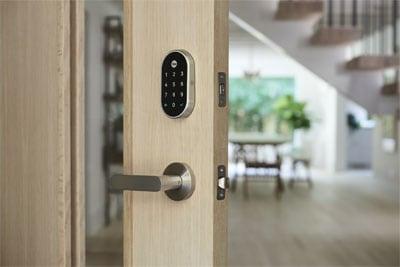

Image Courtesy of: Yale

If you’re in the market for a smart lock, it’s important to know that there are a variety of types available. While traditional locks use a simple key and tumbler design, smart locks use sophisticated technology to operate and keep your home safe.

The type of smart lock you choose depends upon which features you need for your particular application. Let’s briefly go over the types of smart locks and how each of them work.

Keypad or Combination Locks


Keypad locks, like the Nest x Yale Lock with Nest Connect (link to Amazon), allow you to program a code or combination to use when unlocking your door. If you enter the right combination, an electrical current will be generated to retract the lock bolt and unlock the door.

Most combination and keypad locks use a combination of numbers or letters for the key code. The safest keypad locks will only allow a few attempts to enter the correct code before it will temporarily block any more attempts to unlock the door.


Fob Enabled Locks


If you are not familiar with the terminology, a fob is a small device that has been programmed to give you access into a building or space. The most popular example of a fob is one that is used to disarm a car alarm or unlock a car door.

A fob can be easier and more convenient to use than a key to unlock a door.

The technology behind a fob enabled lock is Radio Frequency Identification (RFID). What is RFID? RFID is a system that uses electromagnetic fields to identify and track data stored on tags. This information is transferred using radio waves.

In the case of smart door locks, RFID is used to authenticate or validate that a person has permission to unlock a door.

Fob enabled smart door locks require a reader which is built into the lock. The key fob has a unique code programmed onto a small circuit or microchip.

This microchip transmits the code on a particular radio frequency which can be easily identified by the reader. If the reader identifies that the code is valid, it will then unlock the door.

The No products found. (link to Amazon) has a "double authentication" mode which requires both an RFID tag and a combination code to unlock.

Fingerprint and Biometric Locks
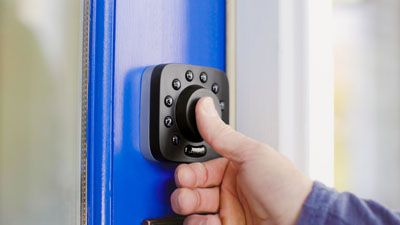

Image Courtesy of: U-tec

Biometric locks utilize the unique features of the person trying to gain access to determine whether or not to grant permission to enter. These features can include fingerprints, the retina or iris of the eye, the shape of the face, the voice, and even the DNA or the odor of an individual.

For residential biometric locks, the most common method of authentication is a fingerprint. The smart door lock will grant access to certain people by recognizing their unique fingerprints.

A fingerprint lock, like the Ultraloq U-Bolt Pro (link to Amazon) uses a scanner to take an image of a fingerprint. It converts the image into numerical data and then saves that information. When someone tries to gain access to a door, the lock will scan their fingerprint, convert it into data, and check it against stored data.

If there is a match, the lock will unlock. If there is no match, access is denied. Many fingerprint door locks also use a second form of authentication, usually a keypad code.


How Smart Locks Can Get Hacked


When installed and used correctly, smart door locks can be just as safe as conventional door locks. And with authentication features like a combination key code or fingerprint and facial recognition, they may be safer than traditional key and tumbler locks.

But if smart locks are not manufactured or programmed appropriately, they can have vulnerabilities.

In 2016, a security researcher named Anthony Rose tested 16 Bluetooth enabled smart locks and found that 12 of them had either “no security or poorly enabled security". Rose presented his findings at DEF CON 24.

The tools Rose used to hack the smart locks are affordable and easy to purchase: a Bluetooth sniffer, like the Ubertooth One (link to Amazon); a Bluetooth USB dongle, like the No products found. (link to Amazon); a Raspberry Pi (link to Amazon); and a high-gain antenna, like the No products found. (link to Amazon).

Now, let’s take a look at the ways Rose was able to break into the smart locks.

Plain Text Passwords


Out of the 12 smart locks that Rose was able to hack, four were sending plain text passwords. This makes it very easy for someone with a Bluetooth sniffer to grab a user’s password and gain access to their house and belongings.

Rose was even able to change the admin password on one of the smart locks which would effectively lock the owner out of their own system.


Replay Attacks


Four other smart locks that Rose tested were susceptible to replay attacks. A replay attack is a hacking method where a valid data transmission is intercepted from a network and then delayed or resent to the network by a hacker.

Since the data being resent is correctly encrypted, the network recognizes it as a valid command. It then carries out the action, either duplicating a transaction to benefit the hacker or allowing network access to the hacker.

In the case of smart locks, encrypted passwords can be captured then resent by a hacker to gain control of the smart lock and access whatever the user was trying to protect.


Decompiling APK’s


.APK files are used to install and run application software on Android operating systems. Hackers will sometimes look into an application’s source code to see if there are any useful clues to help them gain access to a system.

The process involves decompiling the .APK file into Java code so that it is easy to read. From there, the code can be edited and recompiled, or information can be gathered to use in another hacking method.

Rose used a program called Bytecode Viewer to view the code in a readable format. He found that one of the locks he tested had its password hard coded in the smart lock’s app code.


Fuzzing


Fuzzing is the act of repeatedly sending random data permutations to a program to reveal possible vulnerabilities or flaws. Fuzzing is most often used for debugging and testing purposes, but it can also be used nefariously by hackers.

Rose was able to hack one of the smart locks he tested by changing the bytes in its encryption key and continuously sending these malformed packets to the lock. This eventually caused the lock to enter an error state and unlock.

Rose contacted the manufacturer of the smart lock to inform them of this vulnerability. After they were told of the issue, the company quickly took down their website. However, their smart locks are still being sold on Amazon today (link to Amazon).


Device Spoofing


Rose was able to hack another smart lock using a technique called device spoofing. This is a process where a hacker impersonates a device on a network to gain access.

Rose used a Raspberry Pi (link to Amazon) to impersonate the smart lock and tricked its cloud server to send him its password. Rose then sent the password to the smart lock and opened it.


How to Protect Your Smart Lock from Being Hacked

Image Courtesy of: Kwikset

The four locks that Rose couldn’t hack had a few things in common like: true AES encryption, 16-20-character passwords, and 2-factor authentication.

So, while some smart locks can be hacked, there are things you can do and things you can look for when shopping for a smart lock that can help lessen the chance of being hacked.

Here is a list of tips and advice for choosing the safest smart lock for your home.

Buy Smart Locks from Reputable Companies


There are many people (myself included), who are always looking for the best bargains and deals on anything they buy. But when it comes to the security of your home, you should never skimp on the quality of products that you install.

After all, there is something to the saying: “You get what you pay for.”

Schlage, Kwikset, Nest, and Yale are some of the more well-known, trusted brands in smart locks today.

Some lesser known and smaller manufacturers may not include adequate security protocols in their products or will try to build their own protocols in order to skimp on costs.

This practice can lower the price of their products to consumers, but compromises the ability to prevent the threat of hackers.


Make Sure the Smart Lock Uses Proper AES Encryption


Smart locks should, at minimum, use 128-bit AES encryption for all of its communication. AES is the standard encryption method used by the U.S. government and has become the standard for most of the private sector worldwide.


Make Sure the Smart Lock Uses 2-Factor Authentication


2-Factor Authentication (2FA) requires two forms of verification in order to gain access to a system. This makes things a lot tougher for hackers.

Examples of 2FA include using a pin code in addition to a voice command or making sure a user has a password in addition to a security fob before granting permission to enter.


Make Sure the Smart Lock Allows the Use of Longer Passwords


A smart lock should allow the use of long passwords that are at least 16 characters in length. Smart locks that use shorter passwords are more vulnerable to brute force attacks from hackers.

A brute force attack is one of the most popular methods of cracking passwords. With this method, a hacker will try many different variations of passwords in hopes that one of them will eventually work.


Keep Software and Applications Up to Date


Don’t be that person that never updates the apps on their phone. Updates happen for a reason and it’s usually to protect against newly found security threats or to improve the app’s functionality in some way.

Be sure to manually check for updates because some apps and programs don’t update automatically.


Check for the ANSI Grade


The ANSI (American Nation Standards Institute) grade is based on a system developed by the Builders Hardware Manufacturers Association (BHMA). It has more to do with the hardware of the smart lock, rather than the software.

There are specific tests and results that a lock must perform and meet in order to receive a grade. The ANSI grade rates the security, quality, and durability of a lock and is represented by three grade levels.

ANSI Grade 1 – Highest Level of Residential Security – Must endure 1 million opening and closing cycles, Withstand 10 strikes of 75 pounds of force, 1 inch bolt

ANSI Grade 2 – Intermediate Level of Residential Security – Must endure 800,000 opening and closing cycles, Withstand 5 strikes of 75 pounds of force, 5/8 inch bolt

ANSI Grade 3 – Basic Residential Security – Must endure 800,000 opening and closing cycles, Withstand 2 strikes of 75 pounds of force, 5/8 inch bolt

Please see our list of recommended smart door locks below.


Recommended Products


SaleRecommended
Schlage Encode Smart Wi-Fi Deadbolt Lock with Touchscreen Keypad, Keyless Front Door Entry, App Control, Alexa, Google Home and Airbnb Compatible, Aged Bronze, BE489WB CAM 716
  • ANYWHERE ACCESS: With built-in WiFi compatibility, you can easily and securely connect your Schlage Encode Deadbolt to your...
  • PEACE OF MIND: Lock and unlock from anywhere, manage up to 100 access codes for keyless entry, view lock history, receive...
  • VOICE CONTROL: Works with Alexa and Google Home for optional, hands-free convenience when paired with the Schlage Home app...
  • ADVANCED SECURITY: Secure, encrypted connection; built-in, customizable alarm for door movement and forced entry attempts...
  • EASY INSTALL: Install in minutes with just a screwdriver, no hardwiring required; Snap ‘n Stay design helps keep the lock...
SaleRecommended
Philips Wi-Fi Door Lock, WiFi Smart Lock Keyless Entry Deadbolt for Front Door, Compatible with Alexa & Google Assistant, Remote Control, Built-in WiFi, APP Fingerprint Passcode Unlock, Auto Locking
  • 𝐅𝐥𝐞𝐱𝐢𝐛𝐥𝐞 𝐖𝐚𝐲𝐬 𝐭𝐨 𝐔𝐧𝐥𝐨𝐜𝐤: Unlock the way you want: app, passcode...
  • 𝐔𝐧𝐥𝐨𝐜𝐤 𝐅𝐫𝐨𝐦 𝐀𝐧𝐲𝐰𝐡𝐞𝐫𝐞: Built-in Wi-Fi lets you lock and unlock your door...
  • 𝗩𝗼𝗶𝗰𝗲 𝗖𝗼𝗻𝘁𝗿𝗼𝗹 𝗥𝗲𝗮𝗱𝘆: Pair with Alexa or Google Assistant to unlock or lock...
  • 𝗬𝗼𝘂𝗿 𝗙𝗶𝗻𝗴𝗲𝗿𝘀 𝗶𝘀 𝗬𝗼𝘂𝗿 𝗞𝗲𝘆: Just one touch unlocks the door...
  • 𝐂𝐨𝐝𝐞 𝐀𝐜𝐜𝐞𝐬𝐬 𝐌𝐚𝐝𝐞 𝐒𝐢𝐦𝐩𝐥𝐞: Create up to 100 custom passcodes for...
SaleRecommended
Schlage FE695 CEN 622 LAT Touch Century Lock with Latitude Lever, Electronic Keyless Entry Lock, Matte Black
  • KEYLESS CONVENIENCE: Use 2 pre-programmed codes for easy setup out of the box; assign up to 19 codes for trusted friends and...
  • INNOVATIVE DESIGN: Cylinder-free design has no keyway to bump or pick; gain peace of mind with no more keys to lose, hide...
  • BATTERY POWERED FOR RELIABLITY: Operates with included 9V battery; avoid lockouts with dedicated low-battery indicator and...
  • SECURE TOUCHSCREEN ACCESS: Downlighting illuminates numbers, making it easy to enter your code in the dark...
  • EASY INSTALLATION: Replace an existing lever or knob yourself with no skill required; install in minutes with only a...
SaleRecommended
eufy Security Smart Lock C30, Keyless Entry Door Lock, Built-in WiFi Keypad Deadbolt for Front Door, No Bridge Required, Easy Installation, App Remote Control, Reliable Power, BHMA Grade 3
  • Our packaging is being updated. During this period, you may receive either the original or new version packaging. Rest...
  • Remote Control from Anywhere: With built-in Wi-Fi and no bridge required, you can effortlessly control your smart lock from...
  • Smart Lock: Easily open your door using a physical key, voice commands with Alexa/Google Assistant or a physical button. eufy...
  • Easy Installation and Excellent Customer Service: Compatible with most standard Deadbolts. The 15-minute DIY installation...
  • Integrated Smart Home: Pair with a eufy doorbell to seamlessly integrate your smart lock into daily routines. Control all...
SaleRecommended
Kwikset Halo Wi-Fi Smart Lock, Keyless Entry Front Door Touchscreen Deadbolt, App Control, Grade AAA Certified, Easy Install No Hub, Venetian Bronze Finish
  • CONTROL FROM ANYWHERE: Wi-Fi enabled smart door lock (no hub required), use the Kwikset app to remotely lock and unlock...
  • CONVENIENT KEYLESS ENTRY: Enable intelligent geofencing to automatically unlock as you approach your home, unlock using the...
  • SHARE ACCESS WITH GUESTS: Backlit keypad supports up to 250 access codes for keyless entry; use the Kwikset app to share...
  • SMART HOME INTEGRATION: Works with Amazon Alexa or Google Home, control your lock with your voice and create helpful...
  • INTRUSION DETECTION: Instant notifications in the Kwikset app alert you of any unusual lock activity, including invalid code...
SaleRecommended
Kwikset Halo Wi-Fi Smart Lock, Keyless Entry Door Deadbolt, Geofence Auto-Unlock, Grade AAA Certified, No Hub Easy Install, Venetian Bronze Lifetime Finish Warranty, Backlit Keypad
  • CONTROL FROM ANYWHERE: Wi-Fi enabled smart door lock (no hub required), use the Kwikset app to remotely lock and unlock...
  • CONVENIENT KEYLESS ENTRY: Enable intelligent geofencing to automatically unlock as you approach your home, unlock using the...
  • SHARE ACCESS WITH GUESTS: Backlit keypad supports up to 250 access codes for keyless entry; use the Kwikset app to share...
  • SMART HOME INTEGRATION: Works with Amazon Alexa or Google Home, control your lock with your voice and create helpful...
  • INTRUSION DETECTION: Instant notifications in the Kwikset app alert you of any unusual lock activity, including invalid code...
Recommended
Kwikset Halo Touch Fingerprint Wi-Fi Smart Lock, Keyless Entry Door Low Profile Deadbolt, Geofence Auto-Unlock, Grade AAA Certified, No Hub Easy Install, Satin Nickel Lifetime Finish Warranty, Square
  • CONTROL FROM ANYWHERE: Wi-Fi enabled smart door lock (no hub required), use the Kwikset app to remotely lock and unlock...
  • CONVENIENT KEYLESS ENTRY: Enable intelligent geofencing to automatically unlock as you approach your home, unlock using the...
  • TOUCH TO UNLOCK: Unlock your door with your fingerprint, add up to 100 fingerprints (50 users) for friends and family...
  • SMART HOME INTEGRATION: Works with Amazon Alexa or Google Home, control your lock with your voice and create helpful...
  • INTRUSION DETECTION: Instant notifications in the Kwikset app alert you of any unusual lock activity, including invalid code...
SaleRecommended
eufy Security Smart Lock C220, Fingerprint Keyless Entry Door Lock, Built-in Wi-Fi, App Remote Control, Front Door Smart Lock Deadbolt, 8Months Battery, Reliable Power, IP53 Waterproof, BHMA Grade 3
  • 8 Months Battery Life: With 8 AA batteries, Smart Lock C220 runs around 8 months. Experience ultimate convenience and peace...
  • Self-learning AI: Fingerprint door lock recognition gets more precise with every touch, so you don't have to try agian and...
  • Control from Anywhere with Built-in Wi-Fi: No bridge required, you can control your wifi smart lock from anywhere via the...
  • Easy Installation and Excellent Customer Service: Compatible with most standard US&CA deadbolts. 15-minute easy install...
  • Security and Durability: Send an alarm triggered by an unusual attempt to open your smart deadbolt lock. Operating...
SaleRecommended
August Home, Matte Black Wi-Fi Connected Smart Keyless Entry Door Lock (4th Generation), Electronic Door Lock Fits Your Existing Deadbolt in Minutes, ‎AUG-SL05-M01-G01
  • UPGRADE YOUR EXISTING DEADBOLT: August smart locks fit on the inside of your door, making your regular deadbolt smarter, more...
  • GRANT ACCESS WITH THE AUGUST APP: Forget key copying. Quickly and easily share permanent, scheduled or temporary access to...
  • EASY TO INSTALL ON ANY DOOR: Even if you’re not so handy, installation only takes about 10 minutes. August locks fit...
  • AUTO-LOCKS AND UNLOCKS: August Wi-Fi Smart Lock is able to Auto-Unlock as you get home for totally hands-free unlocking...
  • WORKS SEAMLESSLY WITH YOUR SMART HOME: Built-in Wi-Fi allows your lock to work with your favorite voice assistant, including...
SaleRecommended
Veise RZ07 Fingerprint Smart Lock, 7-in-1 Smart Locks for Front Door, Keyless Entry Door Lock with App Control, Biometric Electronic Touchscreen Keypad Deadbolt, Satin Nickel
  • 7-in-1 Fingerprint Smart Lock: You can unlock your door in 0.2 seconds via Fingerprint + App + Web portal + Fobs +Code + eKey...
  • App & Web Portal Control: You can control the smart lock via smartphone, remotely generate eKey and grant access, manage...
  • Enhanced Security: The smart door lock features auto-lock, one-touch locking, privacy mode, passage mode, and low battery...
  • Smart Management: With 50 fingerprints and 250+ multiple user codes, you can remotely generate and share one-time, permanent...
  • Smart Home Integration: With the Veise G2 gateway(sold separately), you can remotely access your smart deadbolt and voice...
SaleRecommended
Smart Door Lock with Apple Home Key, Fingerprint Keyless Entry Door Lock Safety Keypad Deadbolt with Code, Built-in Wi-Fi, IP65, Supports Apple Homekit, Alexa, Google for Front Door or Back
  • Apple HomeKit Enabled: The L600 smart lock is fully compatible with Apple HomeKit. You can unlock it using Apple Home Keys by...
  • Multi-Mode Entry: Multiple unlock methods to meet your entire family's needs: AI fingerprint recognition, Apple Home Key...
  • Automated Security: Enjoy peace of mind with intelligent features like anti-peep, duress codes and auto-locking. Every entry...
  • Reliable Power Supply: The deadbolt lock runs on 8 AA batteries, typically lasting up to 8 months, and sends proactive...
  • All-Weather Durability: The keyless entry door lock is Rated IP65 for resistance to dust and water, and compliant with BHMA...
SaleRecommended
TEEHO TE012W WiFi Smart Lock, Fingerprint Door Lock with Built-in Wi-Fi, Keyless Entry Keypad Smart Deadbolt, App Remote Control, Alexa Compatible, IP55 Waterproof for Front Door – Satin Nickel
  • Built-in WiFi – Control from Anywhere: Connect directly to 2.4GHz WiFi only (no hub required) and remotely control your...
  • Full App Control & Secure Sharing: Effortlessly smart lock permission, manage users, share codes, and customize settings...
  • 5 Smart Ways to Unlock: Unlock via App, Fingerprint (supports up to 20 users), Passcode (up to 100 codes), Backup Keys...
  • Long-Lasting Battery & Low-Battery Indicator: Powered by 8 AA batteries (not included), delivering up to 8 months of battery...
  • Certified Durability & Weather Resistant: BHMA Grade 3 certified and rated IP55 for outdoor weather resistance. Designed to...
SaleRecommended
TEEHO TE012W WiFi Smart Lock, Fingerprint Door Lock with Built-in Wi-Fi, Keyless Entry Keypad Smart Deadbolt, App Remote Control, Alexa Compatible, IP55 Waterproof for Front Door – Satin Nickel
  • Built-in WiFi – Control from Anywhere: Connect directly to 2.4GHz WiFi only (no hub required) and remotely control your...
  • Full App Control & Secure Sharing: Effortlessly smart lock permission, manage users, share codes, and customize settings...
  • 5 Smart Ways to Unlock: Unlock via App, Fingerprint (supports up to 20 users), Passcode (up to 100 codes), Backup Keys...
  • Long-Lasting Battery & Low-Battery Indicator: Powered by 8 AA batteries (not included), delivering up to 8 months of battery...
  • Certified Durability & Weather Resistant: BHMA Grade 3 certified and rated IP55 for outdoor weather resistance. Designed to...
SaleRecommended
Philips WiFi Keypad Door Lock with Handle, Built-in WiFi, APP Remote Control, Voice & Fingerprint Unlock, Smart Locks for Front Door with Auto Lock, Digital Front Door Lock Set, Keyless Entry Deadbolt
  • Connect to 2.4GHz WiFi, No Hub Needed:Connect your Philips 4200 Series Wifi Door Lock Deadbolt directly to your home WiFi...
  • App Control with Real-Time Access:Control smart lock remotely via the Philips Home Access App: lock/unlock, manage user...
  • Voice Assistant Compatible:Hands full? No problem. Use voice commands with Alexa or Google Assistant to lock or check the...
  • 0.3S Fingerprint Fast Access:With this fingerprint keyless entry door lock, unlock your door in 0.3 seconds with fast...
  • Versatile Passcode Options: This Keypad deadbolt supports permanent, one-time, periodic, and recurring PIN codes—perfect...
SaleRecommended
Google Nest x Yale Lock - Tamper-Proof Smart Lock for Keyless Entry - Keypad Deadbolt Lock for Front Door - Satin Nickel
  • Secure smart lock for your front door; replaces the deadbolt lock you already have.Note: Measure your door's backset, cross...
  • Keyless entry on the LED keypad so you can lock and unlock your front door without a key; keypad chimes play sounds to...
  • Let someone in from anywhere; unlock the door with your phone for easy guest access
  • Give unique passcode to family and guests and set a schedule to control when they work; when you don’t want to be...
  • Get alerts when someone locks or unlocks the door or tries to tamper with your smart door lock
SaleRecommended
Veise VE017 Fingerprint Smart Door Lock, App Control, 8-in-1 Keyless Entry, Auto Lock, Emergency Power Port, Electronic Touchscreen Keypad, Biometric Smart Locks for Front Door, Satin Nickel
  • Smart User Management: Our smart user management system empowers you to take full, remote control of your property access...
  • 8-in-1 Smart Unlock & Locking: Unlock via fingerprint (Swedish FPC tech), App, authorized access, Fob card, code, code...
  • Self-learning AI Fingerprint Recognition: Unlock your door in a blink with our advanced biometric technology; Powered by a...
  • 4 Password Modes & Intelligent Protection: Easily generate and share unlimited remote one-time codes for single use...
  • On-Device Security with Proactive Alerts: Your access data — including entry records, user credentials, and fingerprints...
SaleRecommended
ULTRALOQ U-Bolt Pro WiFi Smart Lock with Door Sensor, 8-in-1 Keyless Entry Door Lock with Fingerprint ID, App Remote Control, Built-in WiFi Keypad Deadbolt, Auto Unlock, IP65 Waterproof, Easy Install
  • Control Your Ultraloq Smart Lock Anytime, Anywhere: Lock, unlock, share access and see a Log of who’s entered and exactly...
  • 8-in-1 Keyless Entry Door Lock: AI-powered Fingerprint ID + Keypad + App Remote Control + Auto Unlock / Auto Lock + Web...
  • Enhanced Security and Intelligence:The Smart Door Lock auto-locks when the door closes and unlocks as you approach with...
  • Smart Home Integration: Works with Amazon Alexa, Google Home, SmartThings or IFTTT as well as the U Home app. Control your...
  • Certified Highest Security and Durability: Meets ANSI Grade 1 Standard. Proven for up to 35 times strength of standard...

About the Author
Hi! My name is Carlos and this is my website. I am fascinated by Smart Home technology. My goal is to share everything I've learned about Smart Homes with you.